Contact salesSign inSign up
AuthsignalAuthsignal
Product
Passwordless / multi-factor authentication (MFA)
Drop-in authentication
Passkeys
Biometric authentication
Risk-based authentication
WhatsApp OTP
Authenticator apps (TOTP)
App verification
Push verificationQR code verificationIn-app verification
SMS OTP
Email OTP
Magic links
See all authenticators
See less authenticators
Palm biometrics
Contactless payments & identity verification
Flexible integration modes
Pre-built UI
Low code
UI components
Customizable
Custom UI
Flexible
Digital credentials API Beta
Authenticate customers instantly using digital credentials
Session management
Keep users signed in across web and mobile after authentication
Fraud Controls
Rules and policies engine
Step-up authentication
No-code rule creation
Risk alerts
User observability
Audit trails
Dynamic linking
Why Authsignal?
Complete authentication infrastructure from enrollment to step-up auth, modular by design
Solutions
By USE CASE
View All
Account takeovers (ATO)
Go passwordless
Call center
SMS cost optimization
Existing apps
QR code payments
Step-up MFA
Palm biometrics payments
By INDUSTRY
View All
Financial services
Marketplace
e-Commerce
FinTech
Crypto
Healthcare
By Integration (identity provider)
Amazon Cognito
Azure AD B2C
Duende IdentityServer
Keycloak
Auth0
NextAuth.js
Custom identity provider
By ROLe
Engineers
Product
Passwordless / Multi-factor Authentication (MFA)
Flexible Integration Modes
Pre-built UI · Low code
UI Components · Customizable
Custom UI · Flexible
Digital credentials API Beta
Authenticate customers instantly using digital credentials
Session management
Issue JWT access and refresh tokens
Why Authsignal?
Plug in Authsignal to elevate your IDP — effortless integration with any architecture.
Drop-in Authentication
Passkeys
Biometric authentication
WhatsApp OTP
Risk-based authentication
SMS OTP
Email OTP
Magic links
Authenticator apps (TOTP)
Push notifications
App verification
Push verificationQR code verificationIn-app verification
Palm Biometrics
Contactless payments & identity verification
Fraud Controls
Rules and Policies Engine
Step-up Authentication
No Code Rule Creation
Risk Alerts
User Observability
Audit Trails
Use Cases
Financial services
Account takeovers (ATO)
Marketplace
Go passwordless
e-Commerce
Solutions
By Use Case
Account takeovers (ATO)
Go passwordless
Call center
SMS cost optimization
Existing apps
QR code payments
Step-up MFA
Palm Biometric Payments
View all Use Cases
By Industry
Financial services
Marketplace
e-Commerce
FinTech
Crypto
Healthcare
View all Industries
By Integration (identity provider)
Amazon Cognito
Azure AD B2C
Duende IdentityServer
Keycloak
Auth0
NextAuth.js
Custom identity provider
By Role
Engineers
PricingAboutDocsBlog
Schedule a call
Try Authsignal
AUS Flag

Authsignal secures millions of passkey transactions out of our hosted Sydney region.

AUS Flag

Authsignal secures millions of passkey transactions out of our hosted Sydney region.

Join us today!
Right icon
Blog
/
Current article
Duende IdentityServer
Multi-factor authentication
Guides

How to add MFA to Duende IdentityServer with Authsignal

Ashutosh Bhadauriya
⬤
May 14, 2025
Share
How to add MFA to Duende IdentityServer with Authsignal

In this guide, we’ll walk you through how you can add multi-factor authentication (MFA) in your Duende IdentityServer using Authsignal — making your authentication system much more stronger and keeping your users’ data safer.

‍

Why MFA Matters

Adding a second verification step makes your system much more secure. While Duende IdentityServer gives you solid authentication for ASP.NET Core apps, passwords alone aren't enough protection these days. MFA helps defend against hackers who steal passwords or trick your users into revealing their login information.

Let’s explore how we can implement this.

‍

Implementation Approach

One key advantage of this implementation is the ability to progressively transition users from traditional password-based authentication to more robust MFA methods. This ensures minimal disruption to your user experience while enhancing security.

In the following sections, we'll explore:

  • Setting up Authsignal with your existing Duende IdentityServer
  • Configuring the authentication flow

Let's get to building.

‍

Repository Structure

For your convenience, we've published the complete source code with all implementation details on our GitHub repository.

The repo consists of two projects:

  • IdentityServer — The authentication server that handles login requests and MFA challenges
    • Runs on https://localhost:5001
    • Contains the Duende IdentityServer core and Authsignal integration
  • WebClient — A sample client application protected by our enhanced authentication
    • Runs on https://localhost:5002
    • Demonstrates how end users will experience the MFA flow

The code samples in this guide are extracted directly from this implementation.

‍

Setting Things Up

Before we get into the code, you'll need to do a bit of prep work in the Authsignal Portal.

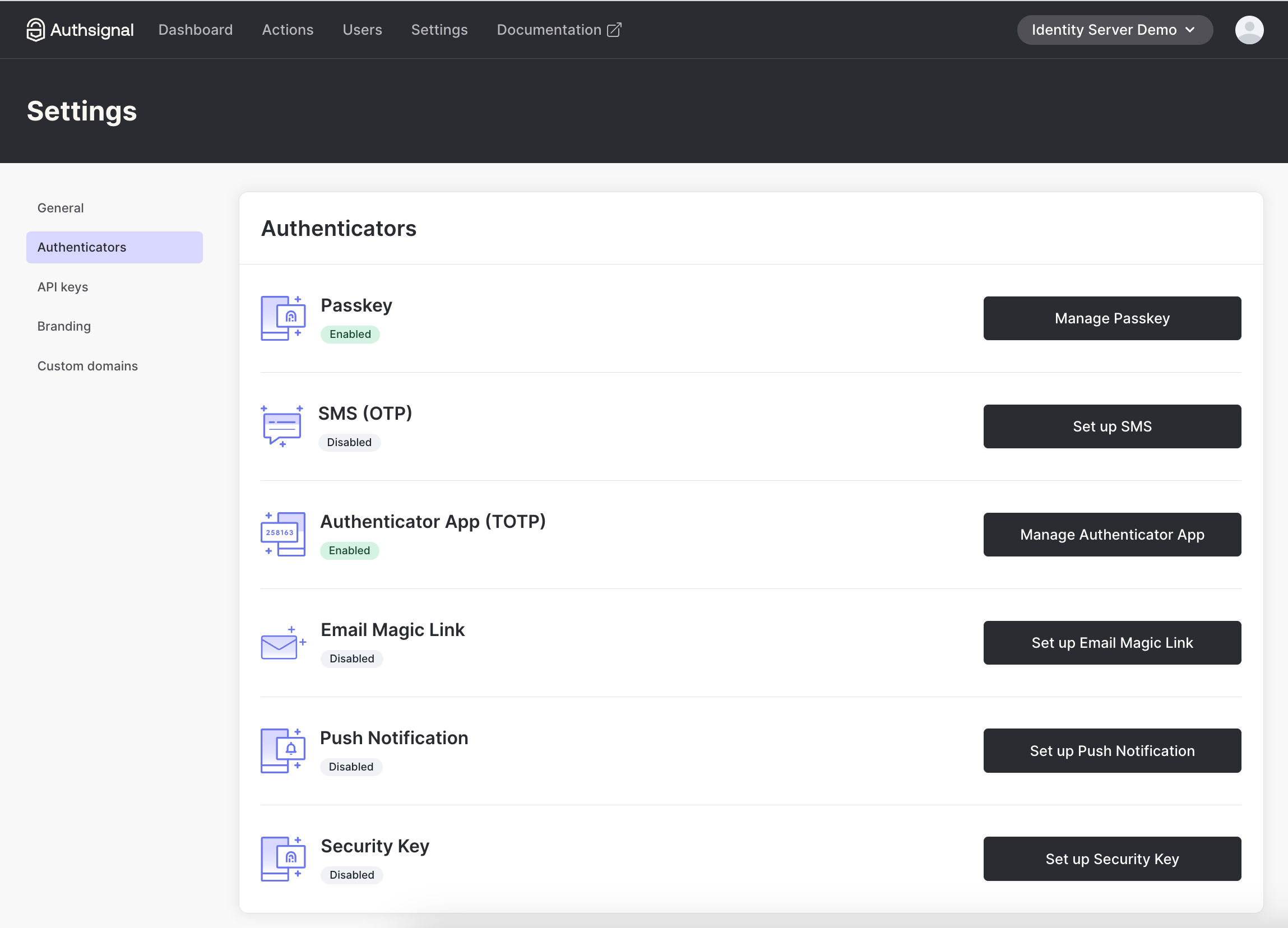
1. Enable the authenticator you want to use (We’ll use Authenticator App for this example)
‍

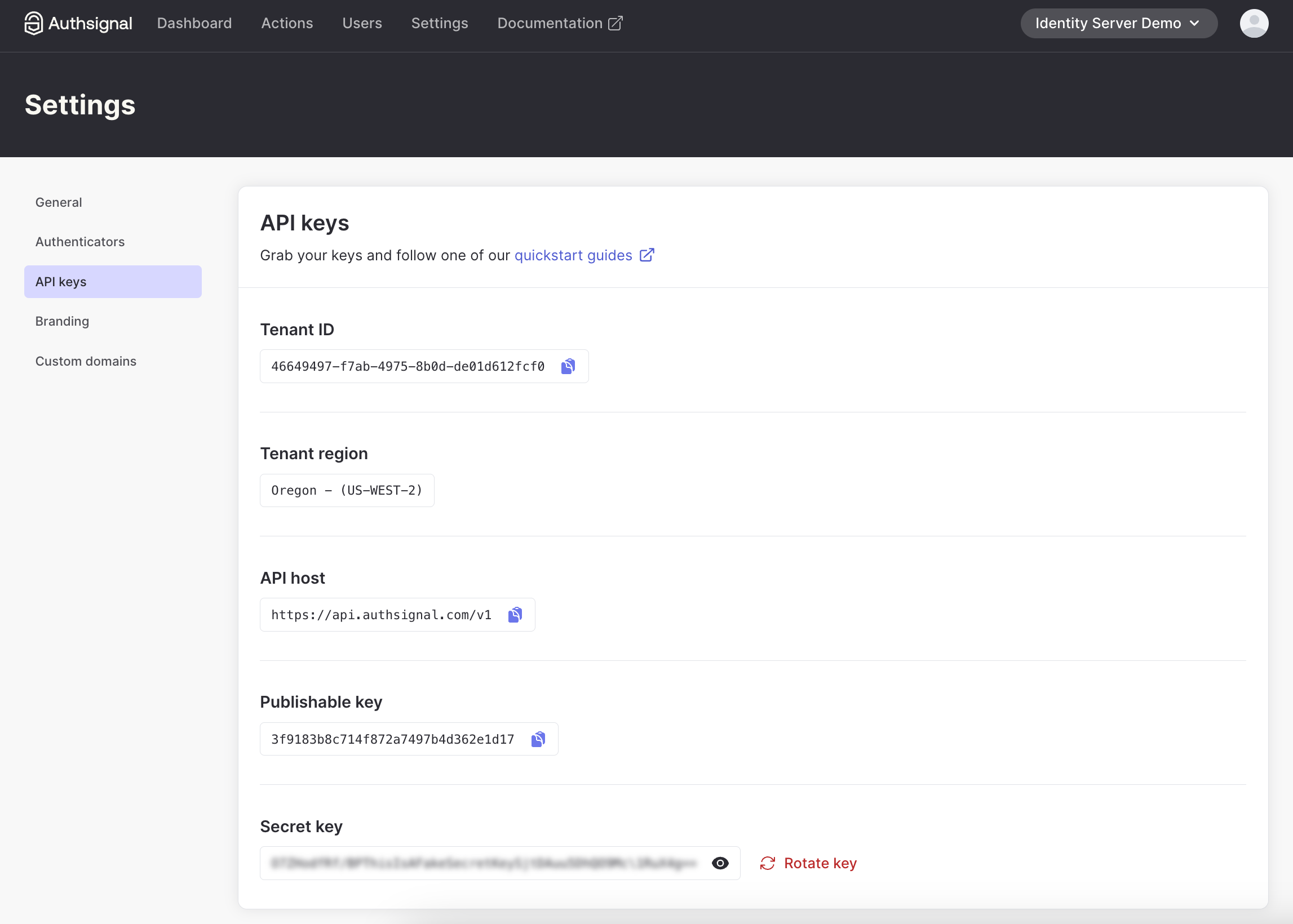
2. Grab your API keys and region URL

3. Add API key secret to the appsettings.json file of both WebClient and IdentityServer. Tenant ID and URL are required in the client-side JS snippet.

‍

Adding MFA to Your Login Flow

The quickest way to implement MFA is using Authsignal's pre-built UI. But don't worry, you can customize it to match your branding.

Here's how the flow is:

  1. User enters username and password
  2. You validate those credentials
  3. If valid, you redirect to Authsignal's MFA challenge
  1. After completing the challenge, the user gets redirected back to your app

‍

Integrating the MFA Challenge

To implement this flow, we need to modify the login process in IdentityServer. The key integration point is right after validating the user's credentials and before issuing the authentication cookie.

Let's look at how we implement this in the login page's POST handler:

// /src/IdentityServer/Pages/Account/Login/Index.cshtml.cs

public async Task<IActionResult> OnPost()
{
  if (_users.ValidateCredentials(Input.Username, Input.Password))
  {
    var user = _users.FindByUsername(Input.Username);

    var trackRequest = new TrackRequest(
      UserId: user.SubjectId,
      Action: "identity-server-login",
      Attributes: new TrackAttributes(
        Username: user.Username,
        RedirectUrl: "https://localhost:5001/Account/Login/Callback?returnUrl=" + returnUrl
      )
    );

    var trackResponse = await _authsignal.Track(trackRequest);

    if (!trackResponse.IsEnrolled || trackResponse.State == UserActionState.CHALLENGE_REQUIRED)
    {
      return Redirect(trackResponse.Url);
    }
  }
}

‍

  1. First, we validate the user's credentials using IdentityServer's built-in user service
  2. If valid, we retrieve the user object to get their unique identifier
  3. We create an Authsignal TrackRequest with three important parameters:
    • UserId: The unique identifier for this user in your system
    • Action: A string identifier for this authentication action (you can create different actions for different security operations)
    • Attributes: Additional context, including where to redirect after MFA completion
  4. We call Authsignal's Track method, which evaluates the user's MFA status
  5. Based on the response, we either:
    • Redirect to Authsignal's MFA challenge if the user needs to enroll or complete verification
    • Continue with the normal authentication flow if MFA passes silently (e.g., if using device fingerprinting and the risk is low)

For convenience, we are prompting users to enroll for MFA on login if they're not yet enrolled. You can move this enrollment step elsewhere in your user journey too.

The RedirectUrl we pass to the track request will be a callback endpoint that we need to add to IdentityServer to validate the result of the MFA challenge.

Validating the MFA Challenge

When the user completes the MFA challenge, they'll be redirected back to your callback endpoint. This is where you verify the result of the challenge and complete the authentication process.

Implementing the Callback Handler

The callback endpoint needs to:

  1. Validate the token from Authsignal
  2. Check if the challenge was successful
  3. Complete the authentication if verification passed
  4. Redirect to the original destination

Here's how we implement this in our callback handler:

// /src/IdentityServer/Pages/Account/Login/Callback.cshtml.cs

public async Task<IActionResult> OnGet(string returnUrl, string token)
{
  var validateChallengeRequest = new ValidateChallengeRequest(Token: token);
  var validateChallengeResponse = await _authsignal.ValidateChallenge(validateChallengeRequest);
  var userId = validateChallengeResponse.UserId;
  var user = _users.FindBySubjectId(userId);

  if (validateChallengeResponse.State != UserActionState.CHALLENGE_SUCCEEDED)
  {
    // MFA challenge failed - send them back to login
    return Redirect("https://localhost:5001/Account/Login?ReturnUrl=" + returnUrl);
  }

  // Success! Proceed with authentication and issue session cookie
  // [authentication code here]
}

‍

Let's break down this code:

  1. We receive the token parameter from the redirect URL - this contains the verification result
  2. We pass this token to Authsignal's ValidateChallenge method to verify its authenticity
  3. From the response, we extract the user ID to find the corresponding user in our system
  4. We check if the challenge state is CHALLENGE_SUCCEEDED:
    • If not, we redirect back to the login page - this means the user failed verification
    • If successful, we proceed with normal authentication (issuing cookies, etc.)

This callback handler is the critical final piece that completes the MFA flow. After successful verification, you would complete the standard Duende IdentityServer authentication process by issuing the appropriate cookies and redirecting to the requested resource.

Using Email-Based MFA

If you're using email and password as your primary authentication and want to use an email-based Authsignal method (OTP or magic link) as the secondary MFA step, you can avoid asking for the email twice by passing it with your track request:

var trackRequest = new TrackRequest(
    UserId: user.SubjectId,
    Action: "identity-server-login",
    Attributes: new TrackAttributes(
        Email: user.Email,
        RedirectUrl: "https://localhost:5001/Account/Login/Callback?returnUrl=" + returnUrl
    )
);

‍

You might also want to disable "Self-service management" for email authenticators in the Authsignal Portal to prevent users from changing their email in the MFA UI.

‍

Wrapping Up

That's it for adding MFA to your Duende IdentityServer! You've now got a more secure login flow that requires users to prove their identity with a second factor.

You can find the complete code example referenced in this guide on GitHub.

In the next part of this series, we'll show you how to add passkey support to give your users an even smoother and more secure login experience. Stay tuned!
Question icon
Have a question?
Talk to an expert
NewsletterDemo PasskeysView docs
Duende IdentityServer
Multi-factor authentication
Guides

You might also like

Why pension funds are turning to liveness detection for presence verification
Liveness Detection
Identity Verification
Fraud prevention

Why pension funds are turning to liveness detection for presence verification

April 20, 2026
How a global real estate company strengthened MFA with Authsignal
Azure AD B2C
Multi-factor authentication
Passkeys

How a global real estate company strengthened MFA with Authsignal

April 14, 2026
What is Visa VAMP? Thresholds, fees, and how it affects your dispute ratio
Visa VAMP
Chargebacks
Dispute Management

What is Visa VAMP? Thresholds, fees, and how it affects your dispute ratio

April 13, 2026

Secure your customers’ accounts today with Authsignal

Passkey demoCreate free account
Authsignal Purple Logo

Authsignal delivers passwordless and multi-factor authentication as a service. Focused on powering mid-market and enterprise businesses to rapidly deploy optimized good customer flows that enable a flexible and risk-based approach to authentication.

AICPA SOCFido Certified
LinkedInTwitter
Passwordless / multi-factor authentication (MFA)
Pre-built UI (low code)UI components (customizable)Custom UI (flexible)
Why Authsignal?
Drop-in authentication
Risk-based authentication PasskeysBiometric authenticationWhatsApp OTPSMS OTPEmail OTPMagic linksAuthenticator apps (TOTP)Push authenticationPalm biometricsDigital Credential Verification API
Rules and policies engine
User observability
Industries
Financial services
Marketplace
e-Commerce
FinTech
Crypto
View all industries
Teams
Engineers
Use cases
Account takeovers (ATO)
Go passwordless
Call center
SMS cost optimization
Existing apps
View all use cases
Identity providers (IDPs)
Amazon Cognito
Auth0
Azure AD B2C
Custom identity provider
Duende IdentityServer
Keycloak
NextAuth.js
Integrations
ASP.NET
C#
Java
Node.js
Open ID Connect (OIDC)
PHP
Python
React
Ruby
Ruby on Rails
Compare
Twilio Verify vs AuthsignalAuth0 vs AuthsignalAWS Cognito vs Authsignal + AWS Cognito
Resources
BlogDeveloper docsFree Figma mobile passkeys templateFree Figma desktop passkeys templateFree Figma webapp passkeys template
Company
About usWhy AuthsignalCareersPress releasesPartnersContact us
What is
SMS OTP
Risk Based Authentication
IP Spoofing
Passwordless authentication
Multi-Factor Authentication (MFA)
United States
+1 214 974-4877
Ireland
+353 12 676529
Australia
+61 387 715 810
New Zealand
+64 275 491 983
© 2026 Authsignal - All Rights Reserved
Terms of servicePrivacy policySecuritySystem statusCookies