


.avif)
You've probably heard that passkeys are transforming how we log in to our accounts by getting rid of passwords and making the whole experience smoother while protecting against phishing. But can they really stand alone as your only form of authentication? Let's explore this question together with the latest developments.
Can Passkeys Replace Passwords?
In most cases, yes! Passkeys offer a more secure and user-friendly experience than traditional passwords. Recent data shows passkeys now account for 62% of all authentication challenges, compared to just 33% for SMS-based methods. However, there are some real-world considerations:
- Gradual Transition: Organizations typically can't switch their entire user base to passkeys overnight. The shift usually happens in stages to minimize disruption.
- Legacy Systems: Some older systems may still require traditional passwords until they're updated. About 40% of businesses continue to rely on hybrid authentication systems that blend both passwords and passkeys due to legacy system constraints.
- Cross-Platform Considerations: While synced passkeys work across devices in their ecosystems, cross-platform inconsistencies remain a challenge. However, this is improving rapidly with Windows now supporting synced passkeys, meaning all major operating systems (Apple, Google, and Microsoft) ensure users can securely access their credentials across devices.
Why You Need Backup Authentication Methods
While passkeys are excellent, having backup methods is simply practical common sense. Why?
- Device Support: Over 95% of all iOS and Android devices are now passkey-ready, with over 90% having passkey functionality enabled. However, some older devices may still not support device-bound passkeys.
- Recovery Scenarios: Losing access to a passkey is much less common than forgetting a password, especially when passkeys are synced across devices. But it can still happen users might lose access to their syncing service or accidentally delete a passkey.
Understanding Passkey Security and Fallback Options
An important security principle to remember: your account is only as secure as your weakest authentication method.
If you use super-secure passkeys but your fallback method is a simple email one-time password (OTP), then your overall security is only as strong as that email OTP. For some situations, this might be perfectly fine. For others, you might need something stronger.
When selecting fallback methods, consider both security and convenience. Here's how common authentication options compare against various attack vectors:

As you can see, while passkeys provide the best overall protection, you have several options for fallback methods depending on your security needs:
- Email or SMS One-Time Passwords (OTP): Convenient and familiar to users, but offer lower security as they can be vulnerable to phishing and interception.
- Authenticator App Codes: Provide better security with reasonable convenience, though users need to have the app installed and properly set up.
- Recovery Codes: Offer strong security when stored properly but require users to keep them somewhere safe and accessible.
- Biometric Verification with ID: For high-security needs, especially in regulated industries or when handling sensitive data, methods like selfie-based identity verification with liveness detection provide robust security.
This last option deserves a bit more explanation: With selfie-based verification, users capture images of their government-issued ID and take a live selfie. Liveness detection technology verifies the person is physically present (not using a photo) by asking them to perform specific actions like changing their distance from the camera or turning their head. This approach offers strong security while remaining user-friendly.
.avif)
Watch demo of mobile biometric face verification + passkeys for high assurance passkey binding
Regulatory and Government Support
The regulatory landscape has shifted significantly in favor of passkeys. The US National Institute of Standards and Technology (NIST) has updated its latest guidelines, mandating phishing-resistant multi-factor authentication (including standards like WebAuthn and FIDO2) for all federal agencies. This official endorsement clears the way for government agencies and regulated industries to adopt passkeys with confidence.
Making Authentication Smarter with Adaptive Rules
One way to balance security and convenience is through adaptive authentication(context-aware authentication). This means your system can adjust its security requirements based on the specific situation.
For example:
- If someone tries to recover an account from a device they've used before, a simple verification might be enough.
- But if the recovery attempt comes from an unfamiliar device in another country at 3 AM, the system might require additional verification steps.
These adaptive approaches help ensure that legitimate users can access their accounts without hassle, while keeping attackers out even if they somehow get past the first security checkpoint.
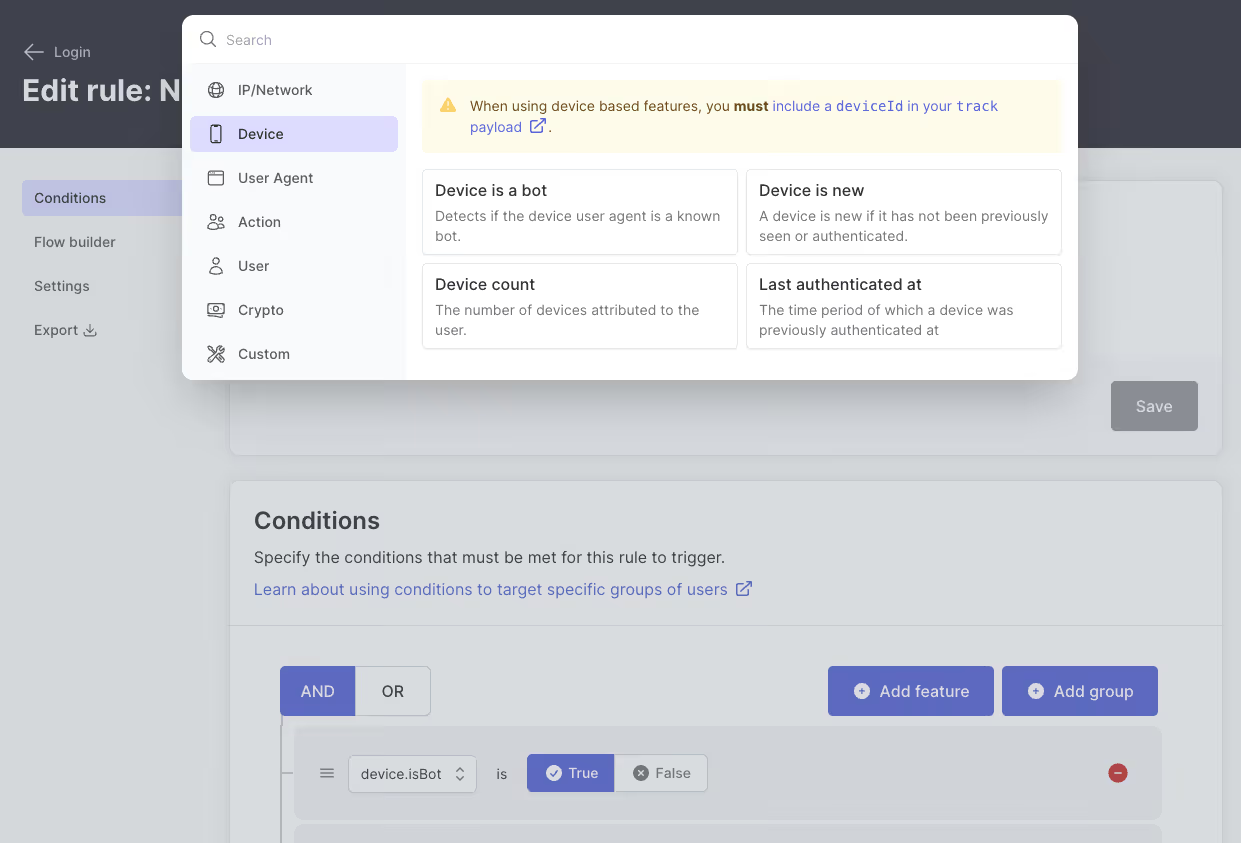
Example of Adaptive Rules in Action
Imagine a financial service platform using passkeys as the primary authentication method. A user initiates an account recovery request claiming they lost their device. Here's how adaptive rules can work:
- Device Recognition Check: If recovery is from a previously used device, a magic link or app-based OTP may be sufficient.
- Unrecognized Device + IP Change: If the attempt comes from a new device and unusual IP address, the system triggers additional verification steps.
- High-Risk Factors: For attempts from high-risk locations or after multiple failed logins, the system might require recovery codes or send warning notifications.
- Behavior Analysis: If the request occurs at unusual hours for that user, the system could enforce a delayed recovery process.
Attackers often exploit weak recovery flows by simulating lost credentials. Adaptive policies minimize these risks by considering context and behavior, making unauthorized access much more difficult.
Latest Technical Developments
The passkey ecosystem continues to evolve with important technical improvements:
WebAuthn Signal API: This new API allows relying parties to update or delete stale passkeys, resolving user confusion when credentials become outdated. The API enables passkey providers to remove incorrect or revoked passkeys from their storage so they're no longer offered to users.
Credential Exchange Format (CXF): A standardized format for securely transferring passkeys between providers is nearing completion. This addresses one of the major barriers to adoption by enabling users to move their passkeys between different password managers and platforms.
Automatic Passkey Upgrades: Major platforms are implementing features that automatically convert existing passwords into passkeys, reducing friction in the transition process.
Best Practices for Implementing Passkeys
When implementing passkeys in your organization:
- Use passkeys as your primary authentication for the security and convenience benefits.
- Choose backup methods appropriate to your security needs - more sensitive data requires stronger fallbacks.
- Consider adaptive policies that adjust security requirements based on risk factors.
- Provide clear recovery paths so users know what to do if they lose access.
- Gradually transition your user base to passkeys while maintaining support for those who aren't ready.
Implementing a Balanced Authentication Strategy
When implementing passkeys in your organization, consider these key principles for a robust approach:
- Start with passkeys as your primary method: They offer the best combination of security and convenience for most users.
- Build a thoughtful recovery system: Implement multiple fallback options based on your security requirements and user needs.
- Apply contextual security: Use adaptive policies that can adjust authentication requirements based on risk factors like device recognition, location, and user behavior patterns.
- Plan for a gradual transition: Allow users to adopt passkeys at their own pace while maintaining support for those who need alternatives.
- Integrate with existing infrastructure: Ensure your passkey solution works seamlessly with your current identity management systems.
At Authsignal, we've seen organizations successfully implement these principles, creating authentication systems that balance strong security with a smooth user experience. The goal isn't perfect security (which doesn't exist) but rather finding the right blend of protection and usability for each specific scenario.
.svg)

.png)
