


Most passkey rollouts hit a plateau. You ship the WebAuthn ceremony, add a passkey button at sign-in, and watch adoption rise for a few weeks, then settle well below the number you planned for.
That plateau is expensive. Every user who taps a passkey the backend rejects, or who never sees one offered, learns the option is unreliable and falls back to passwords. The lesson sticks, and winning those users back costs far more than getting the configuration right the first time.
Registration and authentication are the solved part, well documented and working once the basics are in place. The smaller choices around that ceremony are what decide adoption:
- Does the user know a passkey is available?
- Does the browser show the right credential at the right time?
- Does your app recover quietly when no passkey is available?
- Does the password manager still show credentials your backend no longer accepts?
- Can you upgrade a password user without another enrollment prompt?
The four worth it passkey configurations are mediation, immediately available credentials, the WebAuthn Signal API, and automatic passkey upgrades.
1. Use mediation for passkey autofill
A passkey the user never notices is a passkey they never adopt. Autofill puts it where they are already looking, so it gets used instead of ignored.
For a username or email sign-in form, passkeys usually work better when they appear inside the browser's existing autofill UI.
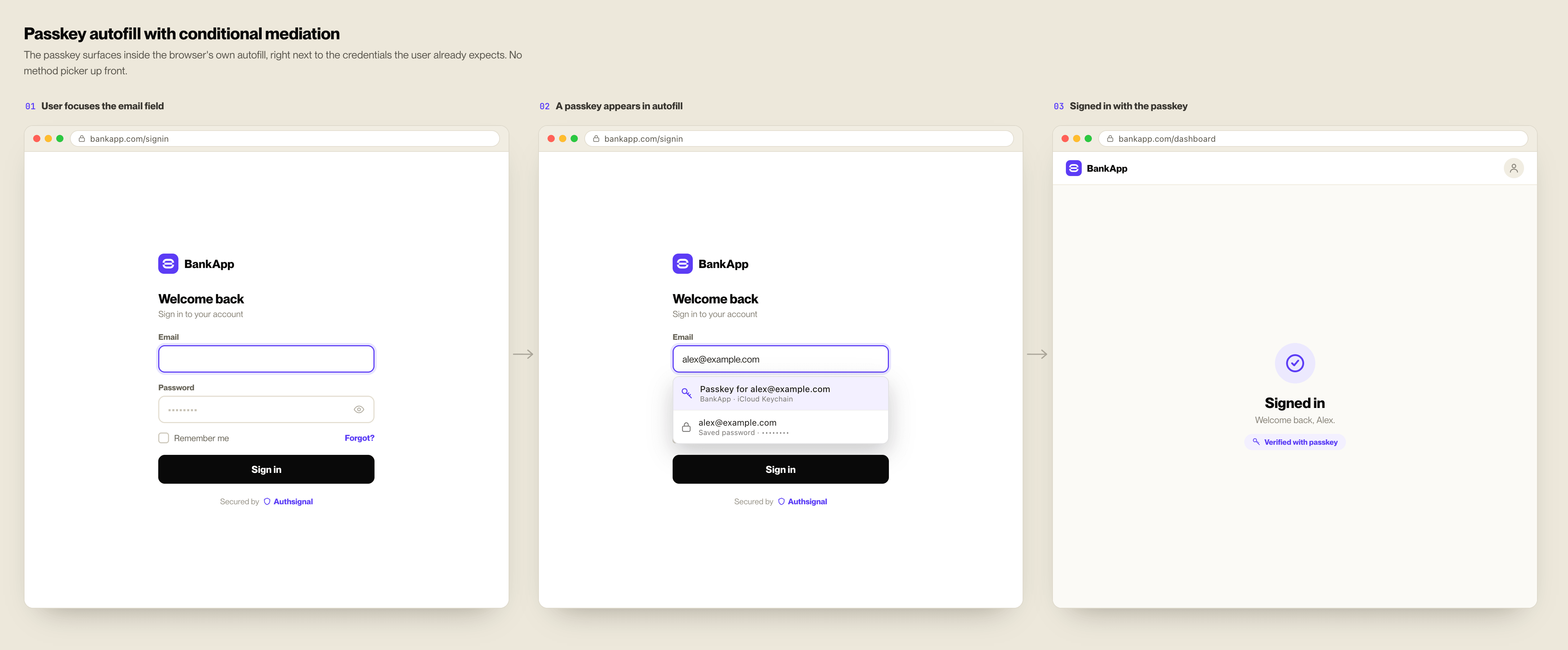
That uses WebAuthn conditional mediation. The site starts a navigator.credentials.get() request when the sign-in page loads:
navigator.credentials.get({
  publicKey,
  mediation: "conditional",
});
The browser does not open a modal immediately. It waits for the user to interact with the username or email field. If the user chooses a passkey from autofill, the credential request resolves and the app can complete sign-in. If the user chooses a password, the password flow continues.
The input field also needs the right autocomplete hint:
<input autocomplete="username webauthn" />Without the webauthn token, the browser may not include passkeys in the autofill surface.
This pattern is useful because it does not ask the user to choose a login method upfront. A passkey appears next to the credentials the user already expects to see. Chrome documents this as passkey form autofill.
If you use Authsignal's Web SDK, this maps to authsignal.passkey.signIn({ autofill: true }) in the Web SDK passkey docs.
2. Prefer immediately available credentials when intent is clear
Autofill works well on forms. Other flows have clearer intent.
A returning user opens the app. Someone clicks "Sign in" from checkout. A session needs a step-up before a high-risk action. In those moments, it can be useful to ask the platform whether a credential is immediately available instead of showing account-picker UI first.
On the web, Chrome's Immediate UI mode does this for passkeys and managed passwords. The browser checks for credentials that can be offered immediately. If none are available, the request fails quickly and the product can continue to the normal sign-in flow.
On Android, the same product idea appears in Credential Manager through preferImmediatelyAvailableCredentials. When that option is enabled, Credential Manager tries to use credentials available on the device or through a credential provider. If it cannot, it avoids showing UI and returns.
On Apple platforms, ASAuthorizationController exposes the same behavior through performRequests(options: .preferImmediatelyAvailableCredentials), available since iOS 16. When no passkey exists on the device, the request stays silent and returns an error to your delegate instead of showing the cross-device QR sheet, so you can fall through to your normal sign-in flow.
Use this as a fast path. The product should still have a normal sign-in route when no credential is available.
Good candidates:
- return-to-app sign-in
- checkout sign-in
- account switching
- step-up checks where the user may already have a passkey
- mobile app launch flows where an account picker would feel heavy
Weak candidates:
- first-time registration
- flows where the user has not shown sign-in intent
- situations where a failed request would create a visible error
3. Use the Signal API to keep credential managers clean
Passkey providers do not automatically know what changed on your server.
A user might delete a passkey from account settings. Your backend might remove an authenticator during account recovery. A user might rename their account. A credential manager might still hold a passkey that your server no longer accepts.
If you do nothing, the user can keep seeing stale credentials. They choose a passkey, the backend rejects it, and the user learns not to trust the passkey option.
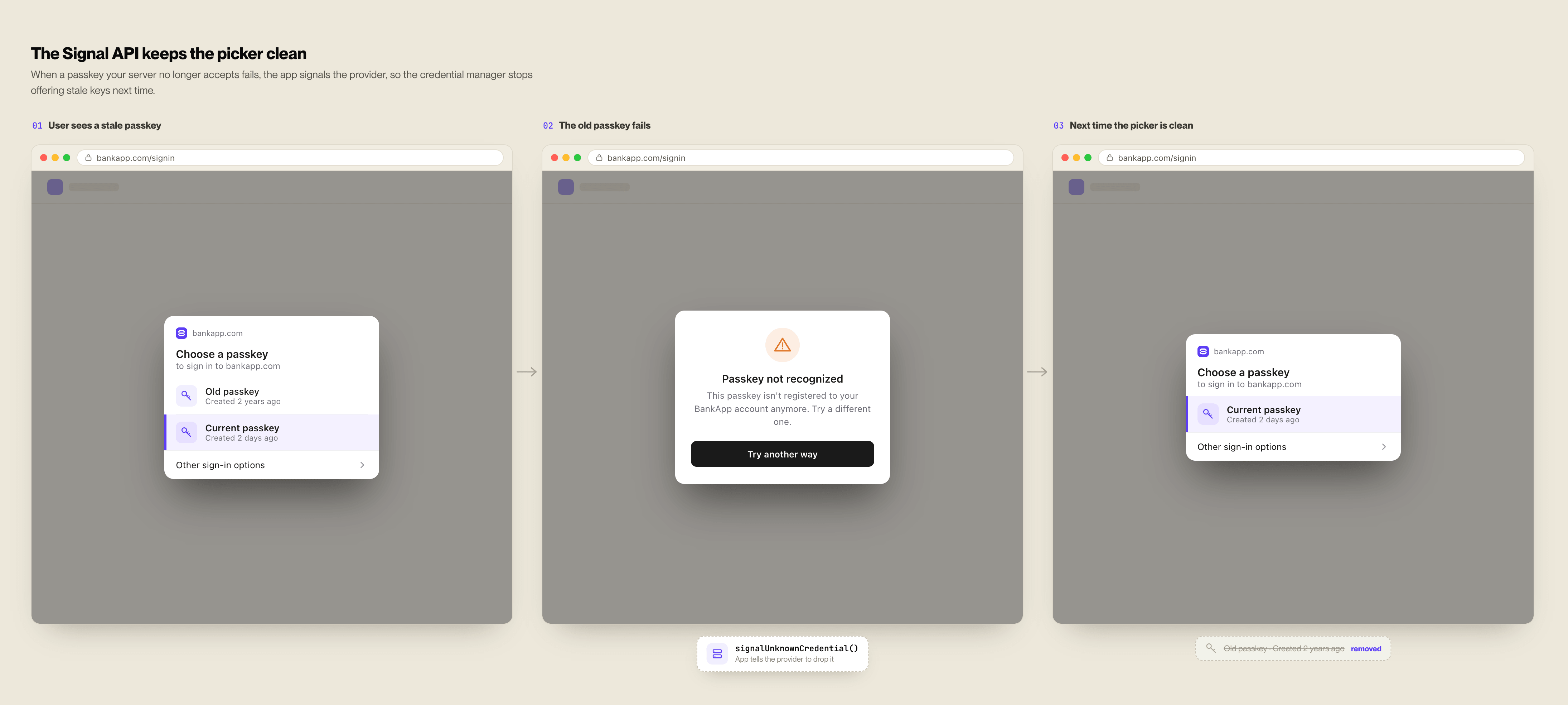
The WebAuthn Signal API gives relying parties a way to send credential state back to the passkey provider:
PublicKeyCredential.signalUnknownCredential()tells the provider a credential is not recognized by the server.PublicKeyCredential.signalAllAcceptedCredentials()tells the provider which credential IDs are valid for an authenticated user.PublicKeyCredential.signalCurrentUserDetails()tells the provider that user details such as username or display name changed.
Use signalUnknownCredential() after a sign-in fails because the credential is unknown. Use signalAllAcceptedCredentials() only after the user is authenticated, because it sends the full valid credential list for that account.
This way the credential picker becomes less likely to show passkeys that cannot work.
4. Upgrade eligible password users automatically
Automatic passkey upgrades reduce friction at the creation step.
The intended flow is:
- A user signs in successfully with a password.
- The site calls WebAuthn Conditional Create.
- The browser and credential provider decide whether the conditions are met.
- If eligible, a passkey is created without a prominent registration prompt.
- If not eligible, the login continues normally.
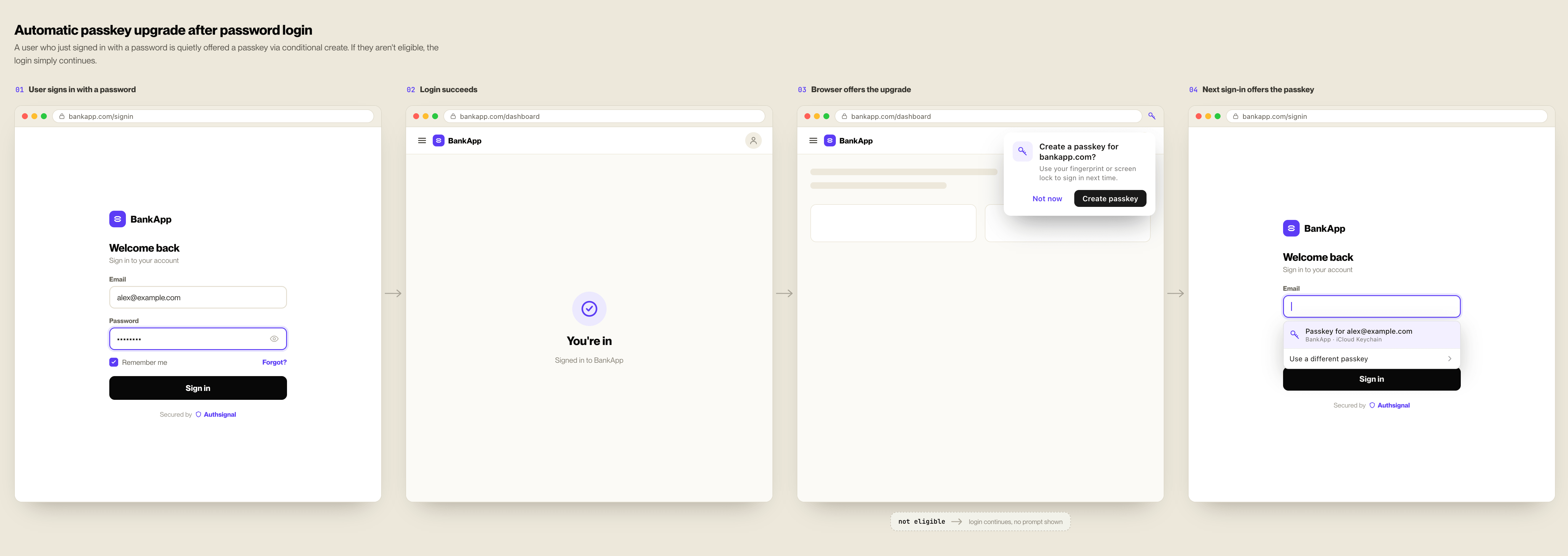
On the web, Conditional Create uses navigator.credentials.create() with conditional mediation:
navigator.credentials.create({
  publicKey,
  mediation: "conditional",
});
Prompted enrollment already drives strong adoption. Automatic upgrades are how you accelerate past it, moving eligible password users to passkeys in the background without adding another prompt to the flow.
There is a standards reason to do this now. NIST's SP 800-63B-4, the current revision of the federal digital identity guidelines, treats synced passkeys as a recognized authenticator rather than an exception to justify, which removes the compliance objection that used to stall this work. What's left is a product question, and automatic upgrades are how you answer it at scale.
This is not a generic upgrade path for every login method. The user generally needs a saved password in their credential manager and must have used it recently. It is designed for password sign-in, not magic links, social login, phone OTP, or other passwordless flows.
As of June 2026, Conditional Create is supported in Safari 18+ on macOS, browsers on iOS/iPadOS 18+, Chrome 136+ on desktop, and Chrome 142+ on Android. The credential provider still matters. iCloud Keychain and Google Password Manager support this flow in their respective environments; third-party provider behavior can vary.
Treat automatic upgrades as quiet background work. An unsupported browser, no saved password, a duplicate credential, or an aborted WebAuthn call should not interrupt the user.
The case that needs care is server registration failure after the browser has created a passkey. That can leave the credential provider and backend out of sync, so registration verification and credential signaling need to be part of the implementation.
In Authsignal's Web SDK, the automatic upgrade hook is exposed through authsignal.passkey.signUp({ useAutoRegister: true })
A practical rollout checklist
For a web app adding passkeys in 2026:
- Add passkey autofill to the existing username or email field with conditional mediation.
- Add the
webauthnautocomplete token to the username or email input. - Use immediate credential flows only where user intent is clear.
- Provide a normal sign-in fallback when no immediate credential is available.
- Signal unknown credentials after passkey verification fails for that reason.
- Signal accepted credentials after authenticated passkey sign-in or account recovery.
- Try automatic passkey upgrades immediately after successful password login.
- Keep expected upgrade failures quiet.
- Track passkey creation rate, passkey sign-in success rate, fallback rate, and unknown credential errors.
These are configuration details, but they decide whether passkeys feel like part of the login flow or an extra feature the user has to discover.
From APIs to adoption
The four configurations are low-level decisions. You decide when to start autofill, when to try an immediate credential, when to signal stale passkeys, and when an automatic upgrade runs in the background. Authsignal keeps those decisions in the authentication layer instead of scattered through your product code, exposed as SDK calls rather than something you assemble by hand. The Web SDK when you own the UI, the Mobile SDKs for native credential flows, the pre-built UI when you want the hosted path.
Three ways to take this further:
- Read the docs. The Web SDK passkey reference covers conditional mediation, immediate credentials, the Signal API, and automatic upgrades, with the exact calls for each.
- See it in production. Air New Zealand, running on Authsignal, saw over 30% of customers opt into passkeys on prompt and call center volume drop 5 to 10% after rollout. The customer story walks through how they got there.
- Talk to the team. If you are planning a rollout and want to pressure-test your recovery flows, step-up logic, and upgrade path before you ship, we can work through it with you.
.svg)
_2026-09-22_23-49-16%20(1).png)
.png)
.png)