


On July 2026, the Government Technology Agency of Singapore (GovTech) started a beta rollout of passkeys for Singpass, the country's national digital identity app. iPhone users go first, with Android and desktop browser support coming in later phases. Singaporeans can now log in to Singpass with Face ID or a fingerprint instead of a password or an SMS one-time password.
The Singpass passkey is device-bound and lives inside the Singpass app itself. It does not sync through iCloud Keychain or Google Password Manager. That decision changes who controls the credential, how recovery works, and how Singpass sits next to the digital credential work happening elsewhere in identity.
What shipped
Singpass is Singapore's national digital identity, a goverment based digital identity scheme, allowing goverment apps and private businesses to allow residents and citizens to “Authenticate with their government identity”. It began in 2003 as a single login for government e-services and has grown into the layer behind verified data sharing through Myinfo, in-person identity checks through Verify, and document signing. GovTech has added a new authentication method every few years: SMS one-time passwords, QR code login when the Singpass app launched in 2018, and Face Verification from 2020, which matches a live face scan against the government's biometric database and is what Singpass leans on for higher-assurance access. Passkeys are the 2026 addition. They sit alongside the existing authentication methods rather than replacing them, so QR login, Face Verification and SMS OTP all still work.
Singpass has more than 4.5 million monthly active app users running over 41 million transactions a month across roughly 2,700 government and private sector services. When Singpass adds a authentication method, it lands in front of most of the adult population and a large share of the country's regulated services.
The setup is pretty quick. iPhone users update the app, tap a banner on the home screen, and follow a prompt to enable autofill. After that, the passkey option appears on the Singpass login page, and the user unlocks it with a fingerprint, face recognition, or the six-digit Singpass app passcode. Under the hood it is standard WebAuthn: a key pair is generated, the private key stays on the device, and the public key is registered with Singpass. At login, Singpass sends a challenge, the device signs it, and Singpass checks the signature against the stored public key.
Two properties make it phishing-resistant. The passkey is bound to the real Singpass login domain, so it will not sign a challenge from a lookalike site. And when a passkey is used to log in to a service on a second device, a short-range Bluetooth proximity check runs first, so the credential only authenticates a device that is physically nearby. That closes off the remote-relay attacks that have plagued QR code login, where a scammer tricks a victim into scanning a code that authorises the attacker's session.
Phishing was the second most common scam type in Singapore in 2025, with reported losses of around S$39.9 million, and several of those scams used fake Singpass pages or QR flows. GovTech has said, for now, there are no plans to extend passkey support to FIDO2 hardware security keys, though it has left the door open to new methods later.
The app is the credential manager
Most consumer passkeys are synced. When you create a passkey on an iPhone, iCloud Keychain encrypts it and replicates it across your Apple devices. Google Password Manager does the same on Android. Sync is convenient. Lose a phone, sign in to your cloud account on a new one, and the passkeys come back. It also widens the attack surface: recovering the credential now depends on the security of a cloud account, which is why NIST still treats a synced passkey as single-factor.
GovTech went the other way. The Singpass app acts as its own credential provider. On iOS this works through the autofill credential provider mechanism, the same hook that lets apps like 1Password or Microsoft Authenticator supply passkeys system-wide. The difference is that Singpass generates device-bound keys that never leave the phone and never touch a sync fabric.
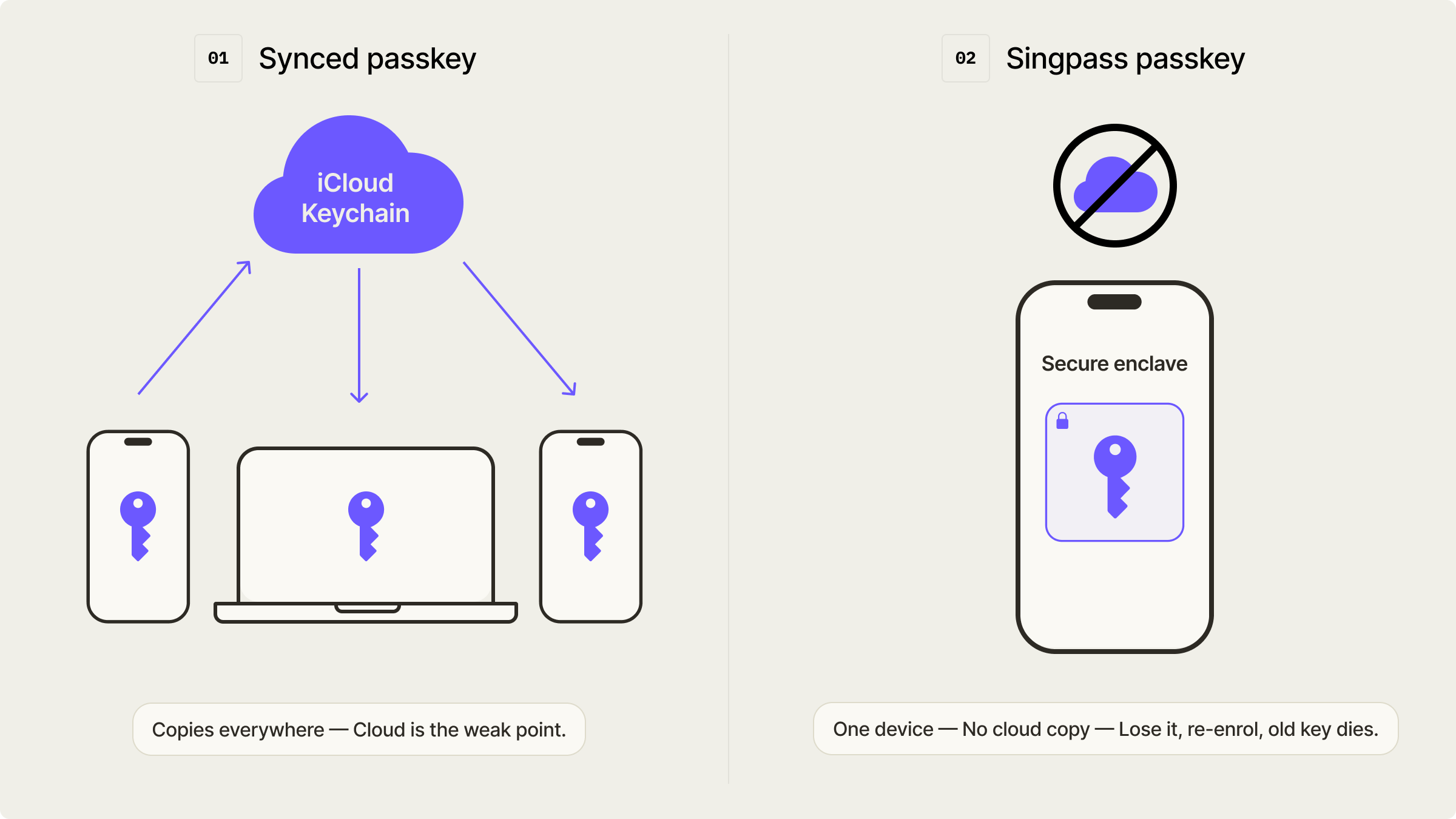
Device-binding buys the platform three things that a synced passkey cannot give it. The private key cannot be copied off the device or leaked through a breached cloud account. There is a clean revocation story: if a device is lost or stolen, the Singpass app and its passkey on that device are automatically deactivated the moment the user sets up Singpass on a replacement phone. And because the key is tied to one trusted device, GovTech can reason about "one person, one active credential" in a way that a fleet of synced copies makes fuzzy.
The trade-off is the usual one for device-bound credentials, covered in more detail in our comparison of synced and device-bound passkeys. There is no automatic cross-device recovery. If you switch phones, you re-enrol. For a national ID with staffed help desks and in-person service counters, that support cost is affordable in exchange for the control. For a typical consumer app, it usually is not, which is why most of them sync.
There is a second trade-off that matters more for the rest of the industry. The build-your-own-manager model fits a national ID, but it does not generalise. If every bank and government service shipped its own device-bound credential manager, users would end up with a drawer full of single-purpose wallet apps and no clean way to reason about which one holds what. Mobile platforms are built to prevent that. iOS gates third-party credential providers behind a dedicated entitlement and makes the user turn each one on by hand, and app-based passkey providers need iOS 17 or later. The friction is deliberate: Apple and Google would rather people lean on a few credential managers than watch the passkey ecosystem splinter into one app per service. Singpass gets a pass because it is the national identity layer, not one service among thousands.
What this means for relying parties
A Singpass passkey authenticates the user to Singpass, and only to Singpass. Other services, including banks, do not receive the passkey directly. They federate through Singpass over OpenID Connect, using the FAPI2 profile with pushed authorisation requests. So when a bank says its customers log in "with Singpass", the bank is a downstream relying party of an identity provider, not the WebAuthn relying party for the passkey itself. Singpass is both the issuer and the verifier of these credentials. If you want the underlying mechanics, we wrote a guide to relying parties for passkeys that covers the RP ID binding this depends on.
Can a Singapore bank insist that a customer only ever authenticates through the Singpass app, and not through some other passkey provider? At the WebAuthn layer, the tool for this is the AAGUID, the identifier that says which authenticator model created a credential, checked at registration through attestation. A relying party can hold an allowlist of AAGUIDs and reject anything else.
The catch, in the consumer world, is that Apple and Google platform passkeys generally do not provide attestation and report a zero AAGUID, so an RP cannot reliably tell an iCloud Keychain passkey apart from anything else or pin acceptance to it. A dedicated app-based provider is different. An app like Singpass can supply attestation and a stable, identifiable AAGUID, which is exactly what makes AAGUID-restriction feasible. In practice the enforcement point sits with Singpass, which already restricts its passkeys to its own app and its own domain. A bank that federates through Singpass inherits that guarantee without having to run the WebAuthn ceremony itself. The effect is close to what our founder Justin Soong flagged when the news broke: at this level of control, a Singapore service can require a device-bound, government-managed credential as the front door, and never build any of it.
Where this bumps into digital credentials
Once you have a government-issued, device-bound, revocable credential that only the government can mint and revoke, you start to think why it is a passkey at all and not a verifiable digital credential.
The two solve different problems. A passkey proves you control an account. It answers "are you the holder of this Singpass login." A digital credential, whether an ISO mdoc mobile driving licence or a W3C verifiable credential, is a signed attestation of attributes issued by an authority. It answers "what is true about you", and it can be presented to any verifier, with selective disclosure, without a live round-trip to the issuer. We covered that split in digital credentials explained.
Singpass is a national identity system, so it lives on both sides of that line. Today it runs a device-bound passkey plus federation, every login is a live handshake with Singpass, which returns a token to the relying service. A wallet moǰdel would flip that. Singpass could issue a signed credential for a citizen's identity attributes into a wallet, and a bank could verify those attributes directly and cryptographically, seeing only what it needs, without Singpass sitting in the middle of every transaction.
This is where the Digital Credentials API comes in, and why some read it as the pattern that eventually supersedes building your own manager. The DC API is a browser standard. A site calls navigator.credentials.get() with a request, the browser shows which wallets on the device can satisfy it, the user picks one and approves, and the browser hands back a response the verifier checks. Chrome reached general availability with it in version 141 in October 2025, and Apple shipped support in Safari on iOS 26. The credentials stay device-bound, the presentation flow is native and hard to phish because the browser passes the real requesting origin to the wallet, and revocation lives with the issuer. That is most of what GovTech built, delivered as platform plumbing that every service can share instead of each one shipping an app. The spec is still a year or two from becoming a full W3C Recommendation, so this is a direction rather than a finished replacement, but it is the direction the platforms are pushing.
For now, passkeys and digital credentials are complementary. The FIDO Alliance has been explicit that the sensible pattern is passkeys for authentication and verifiable credentials for attribute sharing, and most serious digital ID programmes are heading toward using both. What Singpass has shipped is a strong authentication layer with a design that keeps the credential firmly under the issuer's control. Whether GovTech's next move is a wallet and issued credentials is the question worth watching in the region, because Singapore has a habit of setting the bar and its neighbours tend to follow.
If you build for Singaporean users
If you build products that touch Singaporean users, the near-term change is concrete: your Singpass login flows now sit behind a phishing-resistant, device-bound credential, and the QR and OTP paths that scammers abused are no longer the only option. You do not have to do anything to inherit that, because the enforcement lives inside Singpass. The longer-term signal is that a major government identity programme has committed to device-bound credentials it can revoke, which is the same posture that regulated relying parties keep asking passkey vendors for. Authsignal sits in front of your existing identity provider and gives you that today: device-bound enforcement and AAGUID policies, layered over your current stack without a migration. It is also built for where this goes next, verifying digital credentials over the DC API as wallets reach your users, so you can run the passkey login and the credential check from one place instead of picking a side.
Working through passkeys, device-bound enforcement, or digital credentials on your own stack? Talk to our team.
.png)
.png)
.png)