Contact salesSign inSign up
AuthsignalAuthsignal
Product
Passwordless / multi-factor authentication (MFA)
Drop-in authentication
Passkeys
Biometric authentication
Risk-based authentication
WhatsApp OTP
Authenticator apps (TOTP)
App verification
Push authenticationQR code verificationIn-app verification
SMS OTP
Email OTP
Magic links
See all authenticators
See less authenticators
Palm biometrics
Contactless payments & identity verification
Flexible integration modes
Pre-built UI
Low code
UI components
Customizable
Custom UI
Flexible
Digital credentials API Beta
Authenticate customers instantly using digital credentials
Session management
Keep users signed in across web and mobile after authentication
Fraud Controls
Rules and policies engine
Step-up authentication
No-code rule creation
Risk alerts
User observability
Audit trails
Dynamic linking
Why Authsignal?
Complete authentication infrastructure from enrollment to step-up auth, modular by design
Solutions
By USE CASE
View All
Account takeovers (ATO)
Go passwordless
Call center
SMS cost optimization
Existing apps
QR code payments
Step-up MFA
Palm biometrics payments
By INDUSTRY
View All
Financial services
Marketplace
e-Commerce
FinTech
Crypto
Healthcare
By Integration (identity provider)
Amazon Cognito
Azure AD B2C
Duende IdentityServer
Keycloak
Auth0
NextAuth.js
Custom identity provider
By ROLe
Engineers
Product
Passwordless / Multi-factor Authentication (MFA)
Flexible Integration Modes
Pre-built UI · Low code
UI Components · Customizable
Custom UI · Flexible
Digital credentials API Beta
Authenticate customers instantly using digital credentials
Session management
Issue JWT access and refresh tokens
Why Authsignal?
Plug in Authsignal to elevate your IDP — effortless integration with any architecture.
Drop-in Authentication
Passkeys
Biometric authentication
WhatsApp OTP
Risk-based authentication
SMS OTP
Email OTP
Magic links
Authenticator apps (TOTP)
Push notifications
App verification
Push authenticationQR code verificationIn-app verification
Palm Biometrics
Contactless payments & identity verification
Fraud Controls
Rules and Policies Engine
Step-up Authentication
No Code Rule Creation
Risk Alerts
User Observability
Audit Trails
Use Cases
Financial services
Account takeovers (ATO)
Marketplace
Go passwordless
e-Commerce
Solutions
By Use Case
Account takeovers (ATO)
Go passwordless
Call center
SMS cost optimization
Existing apps
QR code payments
Step-up MFA
Palm Biometric Payments
View all Use Cases
By Industry
Financial services
Marketplace
e-Commerce
FinTech
Crypto
Healthcare
View all Industries
By Integration (identity provider)
Amazon Cognito
Azure AD B2C
Duende IdentityServer
Keycloak
Auth0
NextAuth.js
Custom identity provider
By Role
Engineers
PricingAboutDocsBlog
Schedule a call
Try Authsignal
AUS Flag

Authsignal secures millions of passkey transactions out of our hosted Sydney region.

AUS Flag

Authsignal secures millions of passkey transactions out of our hosted Sydney region.

Join us today!
Right icon
Blog
/
Current article
Keycloak
Multi-factor authentication
Integration
Managing Authenticators

Add MFA to Keycloak using Authsignal: A Step-by-Step Guide

Steven Clouston
⬤
May 19, 2025
Share
How to add MFA with Keycloak using Authsignal: A Step-by-Step Guide

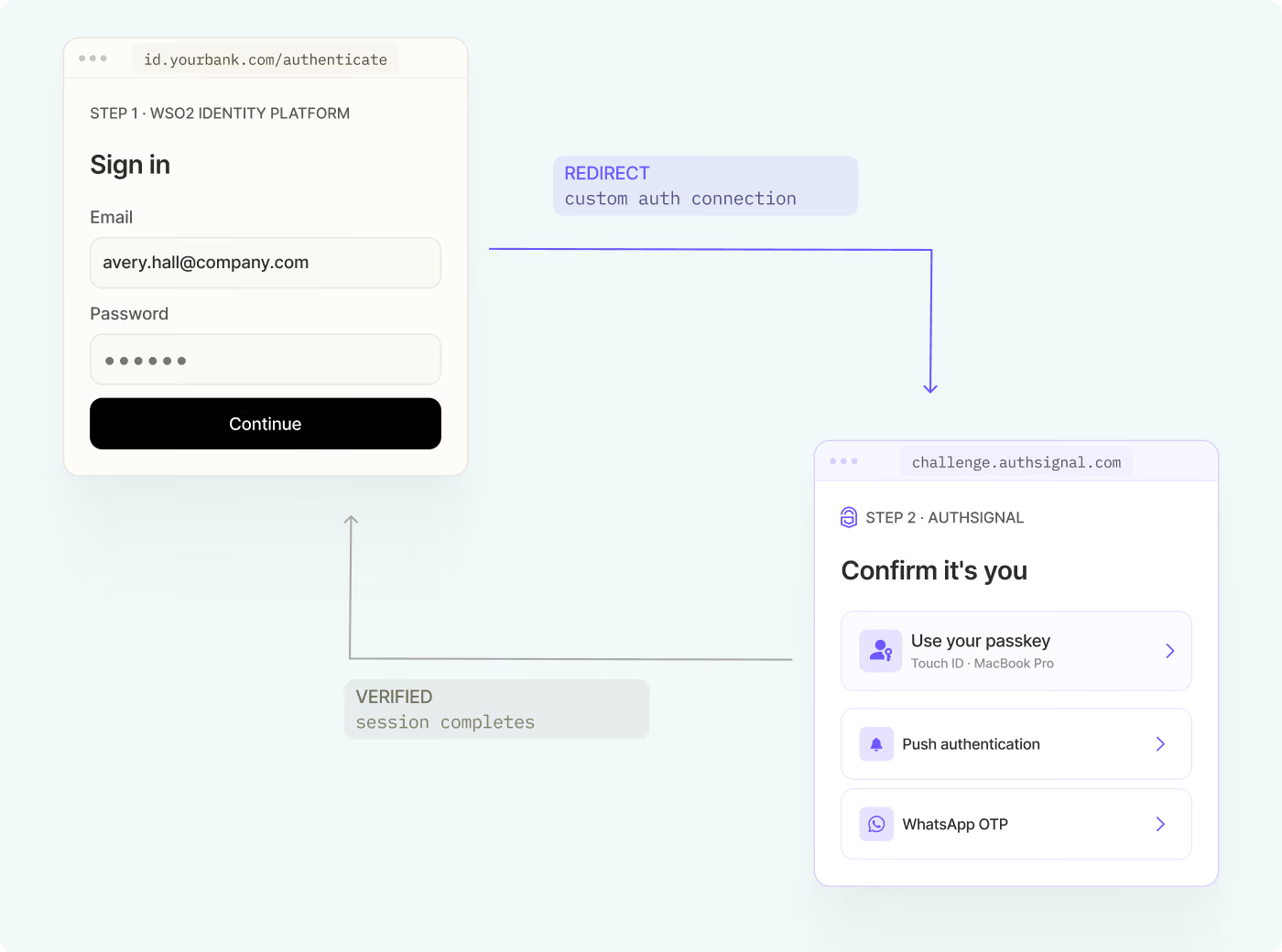
Configuring advanced authentication flows in KeyCloak can be very challenging. The Authsignal provider integration enables you to drop authentication challenges (including passkeys and WhatsApp OTP)  in your sign in flows. Our hosted UX and UI enable rapid deployments, while our full mobile SDK support enables you to build custom mobile experiences.

Let's dive into how to integrate Multi-factor authentication (MFA) with Keycloak using the Authsignal Keycloak provider and the Authsignal Java SDK.

‍

For a visual walkthrough of this integration process, you can watch our step-by-step video guide:

‍

Prerequisites

Before we begin, ensure you have:

1. A running Keycloak server

2. An Authsignal account

3. Basic familiarity with Keycloak administration

‍

Step 1: Download and Install Required Components

First, you'll need to download two essential components:

- The Authsignal Keycloak provider

- The Authsignal Java SDK

Add both components to your Keycloak server's Providers folder. These pre-built tools are designed to work seamlessly with your existing Keycloak setup, though the provider is open-source if you need to make customizations.

‍

Step 2: Configure Authentication Flow

Once the components are installed, follow these steps in your Keycloak admin portal:

1. Create or select your desired realm

2. Navigate to the Authentication section

3. Duplicate the Browser flow

4. Remove the conditional OTP from the flow

5. Add the Authsignal Authenticator provider as a new required step

‍

Step 3: Configure Authsignal Provider

In the provider configuration:

1. Enter your Authsignal tenant secret key

2. Add your Authsignal API URL

3. Enable "Enroll by Default" if you want users to be automatically enrolled in MFA

4. Bind the flow to the Browser flow

‍

Step 4: Set Up Authenticators

In your Authsignal dashboard, configure the authentication methods you want to offer to your users. In this example we are going to use Authenticator app.

‍

Testing the Integration

Once configured, the MFA flow works as follows:

1. Users log in with their username and password

2. First-time users are prompted to enroll in MFA

3. Subsequent logins will require MFA verification

4. Upon successful verification, users gain access to their account

‍

Conclusion

Integrating Authsignal MFA with Keycloak provides a robust security solution while maintaining a smooth user experience. The pre-built components and straightforward configuration process make it accessible for teams of all sizes to implement strong authentication measures.

For more detailed information and advanced configuration options, refer to the Authsignal documentation.

Question icon
Have a question?
Talk to an expert
NewsletterDemo PasskeysView docs
Keycloak
Multi-factor authentication
Integration
Managing Authenticators

You might also like

Why pension funds are turning to liveness detection for presence verification
Liveness Detection
Identity Verification
Fraud prevention

Why pension funds are turning to liveness detection for presence verification

April 21, 2026
How a global real estate company strengthened MFA with Authsignal
Azure AD B2C
Multi-factor authentication
Passkeys

How a global real estate company strengthened MFA with Authsignal

April 14, 2026
What is Visa VAMP? Thresholds, fees, and how it affects your dispute ratio
Visa VAMP
Chargebacks
Dispute Management

What is Visa VAMP? Thresholds, fees, and how it affects your dispute ratio

April 13, 2026

Secure your customers’ accounts today with Authsignal

Passkey demoCreate free account
Authsignal Purple Logo

Authsignal delivers passwordless and multi-factor authentication as a service. Focused on powering mid-market and enterprise businesses to rapidly deploy optimized good customer flows that enable a flexible and risk-based approach to authentication.

AICPA SOCFido Certified
LinkedInTwitter
Passwordless / multi-factor authentication (MFA)
Pre-built UI (low code)UI components (customizable)Custom UI (flexible)
Why Authsignal?
Drop-in authentication
Risk-based authentication PasskeysBiometric authenticationWhatsApp OTPSMS OTPEmail OTPMagic linksAuthenticator apps (TOTP)Push authenticationPalm biometricsDigital Credential Verification API
Rules and policies engine
User observability
Industries
Financial services
Marketplace
e-Commerce
FinTech
Crypto
View all industries
Teams
Engineers
Use cases
Account takeovers (ATO)
Go passwordless
Call center
SMS cost optimization
Existing apps
View all use cases
Identity providers (IDPs)
Amazon Cognito
Auth0
Azure AD B2C
Custom identity provider
Duende IdentityServer
Keycloak
NextAuth.js
Integrations
ASP.NET
C#
Java
Node.js
Open ID Connect (OIDC)
PHP
Python
React
Ruby
Ruby on Rails
Compare
Twilio Verify vs AuthsignalAuth0 vs AuthsignalAWS Cognito vs Authsignal + AWS Cognito
Resources
BlogDeveloper docsFree Figma mobile passkeys templateFree Figma desktop passkeys templateFree Figma webapp passkeys template
Company
About usWhy AuthsignalGuidesCareersPress releasesPartnersContact us
What is
SMS OTP
Risk Based Authentication
IP Spoofing
Passwordless authentication
Multi-Factor Authentication (MFA)
United States
+1 214 974-4877
Ireland
+353 12 676529
Australia
+61 387 715 810
New Zealand
+64 275 491 983
© 2026 Authsignal - All Rights Reserved
Terms of servicePrivacy policySecuritySystem statusCookies